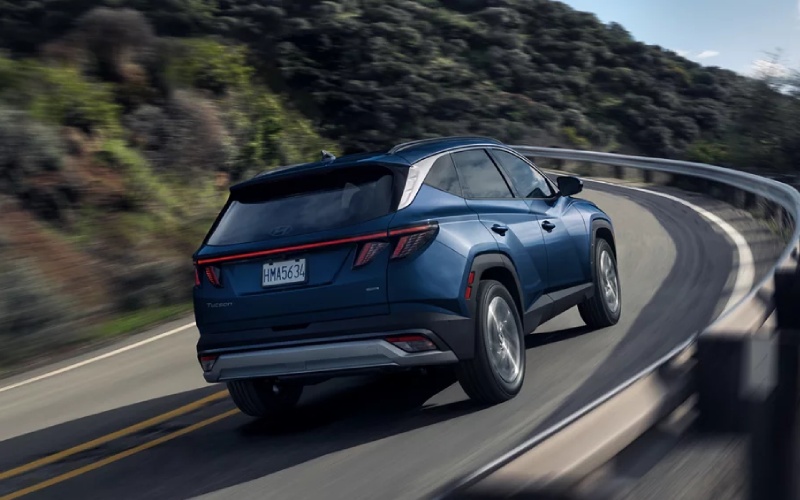
CardinaleWay Hyundai - Smart Confidence for Irvine, CA Drivers — How the 2026 Hyundai TUCSON’s Driver Assistance Eases Daily Traffic
If your weekday routine includes Jamboree Road, Culver Drive, or hopping between the 405 and 5, you know the rhythm of Irvine, CA traffic. The 2026 Hyundai TUCSON approaches those patterns with a calm, built-in advantage: advanced driver assistance that helps you stay centered, aware, and prepared, even when congestion does not cooperate. The cabin design and interface also keep distractions down with a clean Panoramic Curved Display and intuitive controls, so it is easy to focus on what is ahead.
Below, we look at the TUCSON’s safety and assist technologies through a local lens—how they work on real Irvine commutes—plus a few ways to personalize the setup so it feels just right from day one. At CardinaleWay Hyundai, we help shoppers zero in on the trims and settings that match familiar roads like Alton Parkway, University Drive, and the Irvine Spectrum area, so you get the most out of the technology from your very first drive.
The Calm That Comes from SmartSense
Hyundai SmartSense® forms the TUCSON’s standard core of driver assistance. It monitors forward traffic, your lane position, and nearby vehicles in your blind spots to help you anticipate potential hazards. In Irvine’s stop-and-go zones, that baseline matters. It is not only about one feature—it is about how these systems work together to keep you informed without being intrusive.
- Forward Awareness: Alerts and braking support if a vehicle ahead slows suddenly
- Lane Support: Gentle steering input helps you stay centered on the 5 or 405
- Blind-Spot Coverage: Radar-based warnings when a lane change needs a second look
- Rear Cross-Traffic Help: Assistance backing out in busy parking structures
Because Irvine driving often flips between flowing freeway traffic and dense city stretches, a consistent, predictable assist profile helps reduce the mental load. With the TUCSON, you get that consistent support every day.
Highway Driving Assist 2 for Orange County Freeways
Available Highway Driving Assist 2 stands out on longer freeway runs across Orange County. On compatible highways, it combines adaptive cruise with lane centering to help manage your speed and position smoothly—great for moving from the 133 to the 405 or down to the 5. It can also assist with lane changes when conditions allow, adding a natural cadence to the way you navigate traffic waves.
- Lane Centering: Helps reduce drift during extended stretches
- Speed Management: Automatic adjustments with flowing traffic
- Lane Change Assist: Available guidance to move confidently
- Curve Anticipation: Navigation-based adjustments before bends
The benefit is not just comfort—it is continuity. When traffic density changes, HDA 2 makes it feel less jarring. You arrive at the Irvine Spectrum or UCI with that last-mile focus intact.
Dial In Your Settings for Daily Routes
Set up your TUCSON to match your exact commute. The driver assistance menu lets you customize alert tones, steering support levels, and following distances. Pair that with your preferred drive mode, and you can theme the TUCSON around your comfort preferences, whether you prefer a light steering feel for parking around University Town Center or a steadier weight on the 405.
- Alert Tuning: Choose how early and how often the system notifies you
- Steering Support: Adjust lane assistance input levels
- Cruise Gap: Set your ideal following distance for traffic flow
- Drive Modes: Tailor throttle and shifting for relaxed or responsive feel
A few minutes in the settings can make a lasting difference every time you head out, especially if your routes vary between the 405, Sand Canyon, and campus areas with frequent speed changes.
Parking Made Simple around Irvine
Available Surround View Monitor and Remote Smart Parking Assist shine in Irvine’s busier parking environments. Structures at the Spectrum Center or office parks can be tight; a 360-degree camera view helps you position precisely, while Remote Smart Parking Assist can help steer into or out of snug spots when space is at a premium. It is a quiet, convenient way to sidestep the stress of tight curbs and columns.
The TUCSON’s compact footprint and excellent visibility work in tandem with these tools. You are less likely to over-correct, and it is easier to line up for a straight-in park on the first try.
Technology That Stays Out of the Way
The Panoramic Curved Display is crisp and consistent; it consolidates key info so you spend less time toggling and more time glancing. Wireless Apple CarPlay and Android Auto connect quickly for turn-by-turn guidance through local streets like Jeffrey Road and Barranca Parkway. With available Digital Key 2 Touch, you can keep your compatible phone or smartwatch handy for access and go—useful when juggling gym bags or laptops between work, home, and errands.
Because Irvine commutes demand attention, intuitive screen layouts and minimal menu diving make a real difference in how engaged and relaxed you feel at the wheel.
Frequently Asked Questions:
What driver assistance features come standard on the 2026 Hyundai TUCSON?
The TUCSON includes Hyundai SmartSense® as standard, which brings Forward Collision-Avoidance Assist, Lane Keeping Assist, Blind-Spot Collision-Avoidance Assist, Rear Cross-Traffic Collision-Avoidance Assist, and more to every trim.
Is Highway Driving Assist 2 available across the TUCSON lineup?
Highway Driving Assist 2 is available on select trims. We help you compare trims to ensure you get HDA 2 with the display, audio, and seating features you also want.
How does Remote Smart Parking Assist help in Irvine parking structures?
It can help steer the TUCSON into or out of tight spaces from outside the vehicle, adding a layer of confidence when columns, tight ramps, or large neighboring vehicles make visibility difficult.
Can I personalize the assistance settings for my daily routes?
Yes. You can adjust alert timing, steering support, and following distance, then save those preferences so the TUCSON behaves the way you like on familiar roads.
What about smartphone access and key sharing?
Available Digital Key 2 Touch allows compatible phones and smartwatches to lock, unlock, and start the TUCSON. You can share access digitally, which is handy for households with flexible schedules.
For Irvine drivers, availability matters as much as capability. We streamline trim and feature selection so you get the exact combination that fits your weekday patterns and weekend plans. With our team serving Irvine, Lake Forest, and Mission Viejo, you have local guidance for everything from freeway assist features to the best way to set up your personal profiles in the TUCSON’s infotainment system.
The best part is how natural the TUCSON feels after a short introduction. Once your alerts, drive mode, and favorite audio sources are set, it becomes a quiet, steady partner for commuting, school pickups, and that nightly sprint from Jamboree to the 405. Our team is ready to help you try these systems where they matter most—on the roads you drive every day.
At CardinaleWay Hyundai, we focus on real-world usability and setup, so your first week with the 2026 TUCSON feels smooth. Bring your daily routes and must-haves, and we will match you to the right trim, turn on the right features, and get you acquainted with the tools that reduce stress and build confidence on Irvine roads.