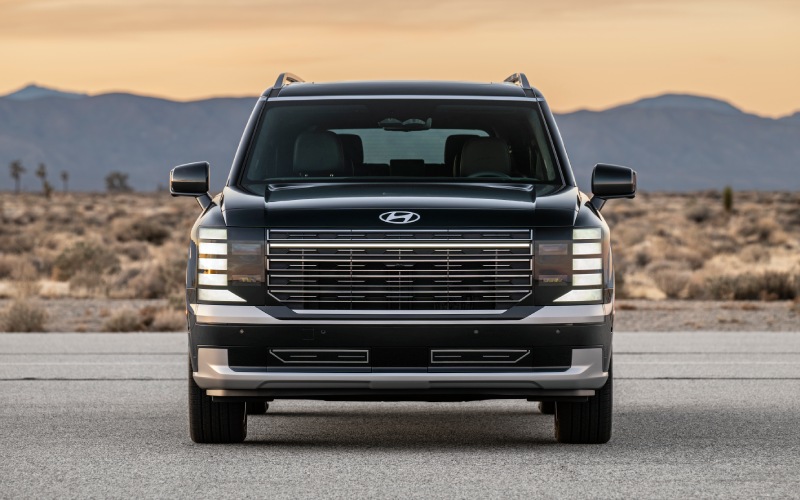
CardinaleWay Hyundai - Does the 2026 Hyundai Palisade have wireless Apple CarPlay® and Android Auto™ near Santa Ana, CA?
Wireless Apple CarPlay® and Android Auto™ come standard in the 2026 Hyundai Palisade, making everyday driving around Santa Ana easier, cleaner, and more connected from the moment you shift into Drive. At CardinaleWay Hyundai, we see how much time our Santa Ana guests spend between the I-5, 55, and 22—quick school drop-offs near Flower Park, back-and-forth to South Coast Plaza, or runs to John Wayne Airport. Cutting the cord matters. The Palisade’s seamless wireless integration removes cable clutter, speeds up your get-in-and-go routine, and gives you crisp, intuitive access to your favorite apps on a panoramic, dual 12.3-inch display.
Beyond mirroring your phone, the 2026 Palisade surrounds that experience with thoughtful hardware and software—like a 15-watt wireless charging pad with an integrated cooling fan, 100-watt USB-C charging in every row, available Bose® 14-speaker audio, and standard over-the-air updates—to keep your tech experience fast, cool, and current in Orange County traffic.
Yes—And why it matters for Santa Ana driving
In dense, stop-and-go corridors like Bristol Street and the 17th Street corridor, having wireless Apple CarPlay® or Android Auto™ is a real-world time saver. You hop in, the Palisade connects, and your commute playlist or your next meeting in Downtown Santa Ana is a tap or voice command away. With Siri or Google Assistant, you can route to Bowers Museum, text updates to a pickup at Santa Ana College, or cue a podcast for the carpool—all while keeping your hands on the wheel.
Parking garages around South Coast Metro can make cables a hassle, too. The Palisade’s Qi-based 15W pad and thoughtful cord-free tray mean you can drop the phone, let the cooling fan help manage temperature, and focus on navigating tight ramps and pay stations. It is the kind of small, daily refinement that adds up over a week of OC errands.
How wireless Apple CarPlay® and Android Auto™ work in the 2026 Palisade
Setup is quick and—once paired—automatic on future drives. Here is what to expect the first time you connect in your Palisade.
- Start the vehicle: Park safely, power on, and ensure your phone’s Bluetooth and Wi-Fi are enabled.
- Open the pairing prompt: On the Palisade’s center display, choose Phone or Projection to begin pairing.
- Confirm permissions: Accept the pairing request on your phone and allow contacts/media if prompted.
- Select your platform: Choose Apple CarPlay® or Android Auto™ when the system asks which interface to launch.
- Make it automatic: Opt to connect automatically going forward so your Palisade pairs as soon as you start.
Once connected, your preferred navigation, music, podcasts, messaging, and calling appear with the familiar Apple or Android layout—optimized for the Palisade’s broad, curved display. Use the steering-wheel buttons or voice commands to keep interactions simple and safe.
Palisade tech that enhances your phone experience
The 2026 Palisade is designed so CarPlay/Android Auto are not just available—they are better. These built-in upgrades make a difference during real OC driving.
- Panoramic, dual 12.3-inch displays: A curved instrument cluster and navigation screen put maps, calls, and media in clear view.
- 15-watt wireless charging with cooling fan: Helps maintain charge speed and manage phone temperature during longer drives.
- Row-by-row 100-watt USB-C ports: High-output charging for passengers in all three rows—great for tablets on 405 backups.
- Available Bose® 14-speaker audio: Rich, balanced sound that elevates playlists and podcasts during I-5 cruises.
- Built-in dual-camera Dash Cam: Can record your drive and help capture incidents in busy lots near South Coast Plaza.
- Bluelink® with Wi-Fi hotspot and OTA updates: Keep software fresh and enable in-vehicle connectivity for passengers.
- Hyundai Digital Key 2.0 Premium: Lock, unlock, and start with a compatible phone or smartwatch—no key fob needed.
Together, these features support the way Santa Ana drivers actually live—multi-stop days, family in tow, and devices that always seem to need a quick charge.
Compatibility, updates, and the details that matter
Apple CarPlay® and Android Auto™ require a compatible iPhone or Android smartphone. Most recent devices support the wireless versions; older phones may prompt you to connect by cable or update software. The Palisade can store multiple paired devices so families can switch drivers easily—simply select the active profile on the center screen when you start up. As a reminder, data for CarPlay/Android Auto uses your phone’s plan, while the available Wi-Fi hotspot relies on a Bluelink® data plan.
Because the 2026 Palisade supports wireless over-the-air updates, infotainment enhancements can be added after purchase. That means your interface and features can continue to improve without a dealership visit—valuable for tech-forward drivers who keep devices up to date.
Everyday Santa Ana scenarios made simpler
Heading from Washington Square to Segerstrom Center for a 7:30 curtain? Ask Siri to navigate as you leave the driveway; your ETA and the best route via the 55 or surface streets display immediately. Picking up at John Wayne Airport? Use Google Assistant to check traffic on MacArthur, send an arrival text hands-free, and pull playlist volume down with a steering-wheel tap. Saturday at the OC Fair & Event Center? The kids can charge and stream in the second and third rows using those 100-watt USB-C ports, while you keep focus on parking.
The Palisade’s thoughtful cabin layout—physical controls where you want them, a double-door center stack, and that open tray—keeps the phone integration invisible until you need it. It all feels calm, natural, and ready for whatever the 5 or 55 decides to throw at you.
Pro tips to get the most from wireless CarPlay/Android Auto
These quick pointers help you keep the experience smooth, especially in summer heat and heavy traffic.
- Keep devices updated: Newer iOS/Android versions often improve wireless stability and speed.
- Use the wireless pad early: Drop your phone on the 15W pad as you start; the cooling fan helps sustain charging on longer I-5 runs.
- Lean on voice commands: Siri and Google Assistant make quick work of texts, calls, and routing—no screen taps required.
- Pre-download maps/music: If you know you will be in garages or low-signal areas, cache media and routes ahead of time.
- Customize your app layout: Put your top three apps within thumb’s reach to minimize distraction at lights.
If you would like help pairing or tailoring your layout, our team will set up your phone at delivery and walk you through best practices in the showroom.
See it live at CardinaleWay Hyundai
We invite you to experience the 2026 Hyundai Palisade’s wireless Apple CarPlay® and Android Auto™ in person. Our product specialists can pair your phone, demonstrate the panoramic displays, and show you how the wireless charging pad and cooling fan behave during a typical Santa Ana commute. You will also be able to explore other Palisade technology—like the available full-display digital center rearview mirror, Hyundai Pay®, and the expanded safety suite—so you can see how the entire system works together.
Driving in and around Santa Ana, Tustin, Costa Mesa, and Garden Grove, you need tech that reduces friction, not adds to it. The 2026 Palisade delivers that with standard wireless integration and the thoughtful touches that make it feel effortless every day. Visit our showroom in Corona—an easy trip via the 91 or 241—to test it for yourself and find the Palisade configuration that fits your life.
Frequently Asked Questions:
Is wireless Apple CarPlay® and Android Auto™ standard on every 2026 Palisade?
Yes. The 2026 Palisade comes standard with wireless Apple CarPlay® and Android Auto™ integration, displayed on the panoramic, dual 12.3-inch screens.
Will wireless CarPlay/Android Auto drain my phone faster in summer heat?
Any wireless projection uses power, but the Palisade’s 15-watt wireless charging pad with an integrated cooling fan is designed to help maintain charge and manage temperature. You can also plug into the 100-watt USB-C ports in any row for rapid wired charging if needed.
Do I need a separate data plan for CarPlay or Android Auto?
No. Wireless Apple CarPlay® and Android Auto™ use your smartphone’s data plan. The available in-vehicle Wi-Fi hotspot is separate and works through Bluelink® connected services.
Can the Palisade pair with more than one phone?
Yes. You can store multiple paired devices and select which phone is active when you start the vehicle. Only one device can run CarPlay/Android Auto at a time, but switching is simple on the center display.
Will the system keep improving over time?
The 2026 Palisade supports wireless Over-The-Air updates for map and multimedia systems, so features and refinements can be added after purchase. Our team will help you verify your Bluelink® setup to enable updates.
Ready to see how the 2026 Hyundai Palisade streamlines daily life around Santa Ana? Contact our team at CardinaleWay Hyundai to schedule a hands-on demo and a test drive. We will connect your phone, walk you through voice commands, and tailor the setup so every ride—from Bristol Street to the 405—feels calmer, cleaner, and more connected.