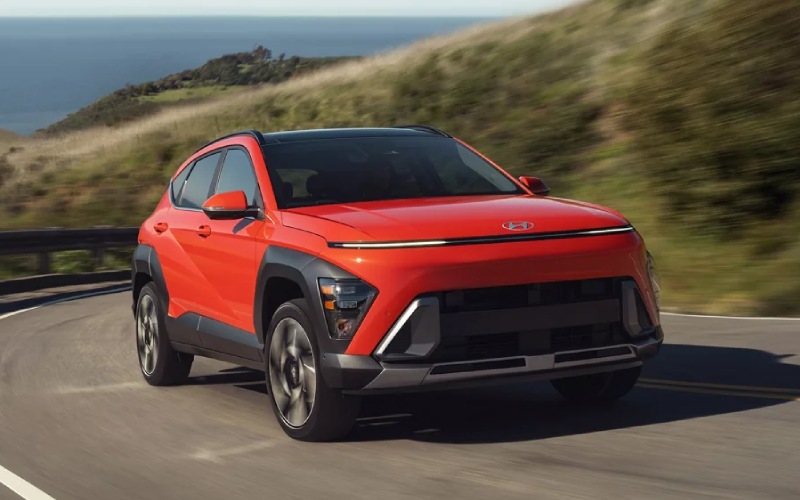
CardinaleWay Hyundai - Does the 2026 Hyundai KONA have wireless Apple CarPlay® and Android Auto™ near Chino, CA?
If you spend time on CA-71 or hop between Chino Spectrum Marketplace, The Shoppes at Chino Hills, and Prado Regional Park, the way your vehicle handles maps, calls, and playlists matters every day. The 2026 Hyundai KONA makes that part effortless with standard wireless Apple CarPlay® and Android Auto™ across the lineup, plus smart touches like a 12.3-inch touchscreen and available wireless device charging. At CardinaleWay Hyundai, we help you get the most from these features on day one and long after, so your KONA feels dialed in for Inland Empire commutes and weekend errands alike.
Why wireless integration matters for Chino-area driving
Cables can be a hassle in real-world stop-and-go around CA-60 and surface streets like Chino Ave. Wireless Apple CarPlay® and Android Auto™ eliminate the cord clutter, keep the center console tidy, and let you slip your phone into a pocket or the console tray while you drive. That means you get turn-by-turn navigation, hands-free calls and texts, and your favorite audio and podcast apps mirrored on KONA’s bright, high-resolution display without plugging in. It is a small convenience that pays off every single trip, whether you are threading through overflow parking at a youth game at Ayala Park or making a late-night airport run down SR-71.
What the 2026 KONA includes out of the box
Every 2026 KONA comes standard with wireless Apple CarPlay® and Android Auto™. That capability pairs naturally with KONA’s digital displays, including the standard 12.3-inch touchscreen and the available 12.3-inch instrument cluster that presents directions, media, and key vehicle info at a glance. On select trims, wireless device charging adds an easy place to top off your phone while you run your day. And with Bluelink+ included at no extra cost, you can remotely start, lock or unlock, and check vehicle status from your compatible smartphone, which is especially handy when Chino Valley temps swing and you want to precondition the cabin before you get in.
Beyond smartphone integration, KONA surrounds you with Hyundai SmartSense driver assistance to help take the edge off local driving. Standard Smart Cruise Control (SCC) with Stop & Go is a welcome assist in afternoon SR-71 congestion, while Lane Following Assist and Lane Keeping Assist help the KONA stay centered. In crowded lots around The Shoppes at Chino Hills, Rear Cross-Traffic Collision-Avoidance Assist can alert you to vehicles approaching from either side and can apply brakes if needed. On upper trims, features like Blind-Spot View Monitor, Surround View Monitor, and Remote Smart Parking Assist go even further, making tight-space parking feel less stressful.
How to connect your phone wirelessly
Pairing is quick and straightforward. Plan to do the first setup while parked at our store so we can walk you through it—or follow the steps below at home in your driveway.
For iPhone (wireless Apple CarPlay®):
- Start your KONA and leave it in Park
- On the touchscreen, select the device connection prompt for Apple CarPlay
- On your iPhone, enable Bluetooth and make sure Wi-Fi is on
- Select your KONA in the Bluetooth device list and confirm the pairing code on both screens
- Allow CarPlay permissions when prompted and follow the onscreen instructions
- Choose to enable CarPlay automatically so it reconnects each time you start driving
For Android (wireless Android Auto™):
- Start your KONA and leave it in Park
- On the touchscreen, select the device connection prompt for Android Auto
- On your Android phone, turn on Bluetooth and Wi-Fi
- Select your KONA in the Bluetooth menu and confirm the pairing code
- Open the Android Auto app if prompted and grant the requested permissions
- Enable automatic reconnection so it pairs hands-free next time
Tips for a smooth experience in Inland Empire heat
Wireless projection makes life easier, especially when you are bouncing between errands in summer. A few simple habits can improve stability and battery life during hot afternoons around Chino.
- Keep the phone in an open console area for airflow rather than a closed compartment
- Remove thick or metal-backed cases when using wireless charging to reduce heat buildup
- Update your phone’s OS and the Apple CarPlay® or Android Auto™ apps for the latest fixes
- Align your phone squarely on the wireless charging pad if your KONA is equipped with one
- Close background apps you do not need so navigation and music run smoothly
If you prefer a higher charging rate on long drives, plug into a USB port to top off faster while you continue to run CarPlay® or Android Auto™ wirelessly. Our team can show you the most convenient port locations for your trim and help you tailor cable management so things stay tidy.
Trim and feature considerations
Wireless Apple CarPlay® and Android Auto™ are standard on all 2026 KONA trims. Wireless device charging is available on select trims, such as KONA SEL Sport, so you can place your compatible smartphone on the charging pad and let it top off while you drive. If you are comparing trims for your Chino commute, we can walk you through the added convenience features that pair well with wireless projection—like the available 12.3-inch instrument cluster, ambient interior lighting, and advanced parking aids on Limited.
If you regularly climb the rolling grades toward Chino Hills State Park or merge briskly onto CA-60, consider how you drive as you choose your configuration. The available 190-hp turbocharged 1.6L GDI 4-cylinder brings confident power, and available HTRAC All Wheel Drive adds sure-footed traction when roads get slick after a rare SoCal shower. No matter which powertrain you select, your wireless smartphone setup works the same, so your everyday tech routine stays consistent across the lineup.
One more everyday benefit you will notice quickly: KONA’s voice interaction through Apple CarPlay® and Android Auto™ lets you keep your eyes up and hands on the wheel. Ask for a route to Ruben S. Ayala High, skip a track, or call ahead for takeout near Central Ave—without taking your focus off the drive.
Make setup easy with CardinaleWay Hyundai
When you take delivery from our team, we will pair your primary phone, show you how to add a second driver, and help you set default preferences for map and audio apps. We will also help you activate Bluelink+ so remote features are ready the first time you need them. If you ever switch phones or need a quick refresher, stop by our showroom off the 91 in Corona—we are happy to re-pair your device and verify your KONA is running the latest software for a seamless experience.
Frequently Asked Questions:
Do all 2026 KONA trims include wireless Apple CarPlay® and Android Auto™?
Yes. Wireless Apple CarPlay® and Android Auto™ are standard on every 2026 KONA, so you get cable-free mirroring regardless of trim.
Does the 2026 KONA have wireless device charging?
Wireless device charging is available on select trims, including KONA SEL Sport. If this is a must-have for your daily routine around Chino, our team will help you confirm availability on the specific KONA you choose.
Will Apple CarPlay® or Android Auto™ use my phone’s data plan?
Yes. Navigation, music streaming, and other connected apps use your smartphone’s data just as they do when you hold the phone in your hand. If you want to reduce data usage, download maps for offline use where supported and cache playlists over Wi-Fi before you head out.
What should I do if my wireless connection drops?
First, make sure Bluetooth and Wi-Fi are enabled on your phone and that your OS and apps are up to date. Clear any duplicate KONA profiles in your phone’s Bluetooth settings and re-pair. Avoid stacking the phone with other devices that might cause interference, and keep it in an open area for better signal and cooling.
Does Bluelink+ come with the 2026 KONA?
Bluelink+ is included at no extra cost, letting you remotely start, lock or unlock, and check vehicle status from your compatible smartphone. We will help you set up the app and create your account during delivery so you can use it right away in the Chino area.
Can two drivers use wireless Apple CarPlay® or Android Auto™ with the same KONA?
Yes. You can pair multiple phones to your KONA and select which one connects for a given drive. During delivery, we will show you how to manage paired devices and set your preferred connection order.
Tech should simplify your life, not add steps. With standard wireless Apple CarPlay® and Android Auto™, the 2026 Hyundai KONA does exactly that—making your daily drives around Chino, Chino Hills, and the wider Inland Empire feel more connected and less cluttered. If you would like a hands-on demo, visit CardinaleWay Hyundai in Corona. We will walk you through pairing, help you compare trims, and set up Bluelink+ so your KONA is ready for the road the minute you pull onto CA-71.
Ready to see how seamlessly your phone works with KONA’s 12.3-inch touchscreen? Stop by for a test drive, and we will have your favorite apps, playlists, and destinations showing on the display before you leave the lot.