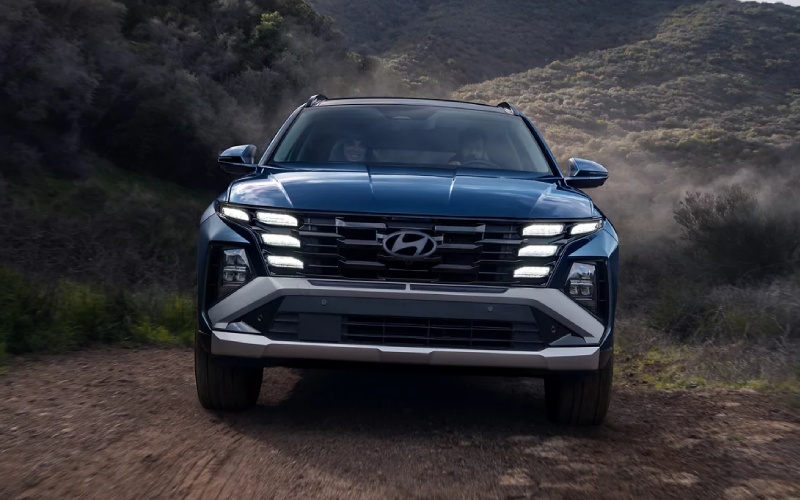
CardinaleWay Hyundai - Can the 2026 Hyundai TUCSON actually ease I-5 and 55 traffic around Santa Ana, CA?
Sitting in Orange County traffic is a fact of life, and if you live or work around Santa Ana, you probably spend time on the I-5, SR-55, or SR-22. The real question shoppers bring to our team at CardinaleWay Hyundai is whether the 2026 Hyundai TUCSON has driver-assistance technology that truly helps in stop-and-go congestion and multi-lane merges. The short answer from our test drives and owner feedback is that TUCSON’s Hyundai SmartSense features are built for exactly these conditions—layered, confidence-building tech that works with you to take the edge off daily driving.
Why this question matters in Santa Ana
From Bristol Street on-ramps to the SR-55 interchange, traffic density changes minute to minute. Drivers navigate short merges, tight garage parking in Downtown Santa Ana’s Artists Village, and frequent lane shifts near the I-5 reconstruction zones. A vehicle that can smoothly manage following distance, assist with centering in your lane, and help you stay alert genuinely improves day-to-day life here. That’s the ownership lens we use when we guide you through the 2026 TUCSON.
What the 2026 TUCSON does in real stop-and-go
Every 2026 TUCSON comes with a thoughtful suite of Hyundai SmartSense features. On SE and SEL, Smart Cruise Control (SCC) with Stop & Go can maintain your set speed and distance and bring the vehicle to a complete stop—then resume if the car ahead moves within three seconds. In Santa Ana’s crawl on the I-5, that means the TUCSON helps with the tedious parts while you keep your hands on the wheel and eyes on the road.
Step up to SEL Premium or Limited, and Smart Cruise Control 2 (SCC2) enhances that experience. If the system recognizes you as unresponsive via Forward Attention Warning, SCC2 may slow the vehicle to a stop and keep the TUCSON centered in its lane. Pair that with Navigation-based Smart Cruise Control with Curve Control on these trims and the TUCSON can proactively adjust speed for curves and speed-controlled zones based on map data—useful on the SR-55’s sweeping connectors and near school zones on surface streets.
- Smart Cruise Control (SCC) with Stop & Go: Standard on SE and SEL for distance-keeping and smooth, low-speed braking and resuming.
- Smart Cruise Control 2 (SCC2): Standard on SEL Premium and Limited for enhanced lane-centering support if you become unresponsive.
- Navigation-based Smart Cruise Control with Curve Control: Standard on SEL Premium and Limited to help manage speeds on curves and in speed zones.
- Highway Driving Assist (HDA): Standard on SEL Premium and Limited to help maintain set distance and center the vehicle in your lane on highways.
- Lane Following Assist (LFA) and Lane Keeping Assist (LKA): Standard on all trims to assist steering and keep the TUCSON properly positioned.
- Driver Attention Warning (DAW): Standard on all trims to monitor patterns and alert you if signs of inattention appear.
- Forward Collision-Avoidance Assist (FCA): Standard on all trims with pedestrian, cyclist, and junction turning detection.
- Blind-Spot Collision Warning (BCW): Standard on all trims for visual and audio alerts when a vehicle is in your blind spot during lane changes.
Used as a system—SCC or SCC2 for the heavy traffic, LFA/LKA for centering, and HDA on freeway stretches—the TUCSON’s assistance feels natural. It supports your routine commute without trying to drive for you.
Trim guide for commuters comparing tech
If your daily drive is mostly city streets with occasional freeway time, you’ll appreciate the SE or SEL plus standard SCC with Stop & Go, FCA, BCW, and the 12.3-inch touchscreen with wireless Android Auto and Apple CarPlay support. If your life involves routine I-5 or SR-55 congestion, the SEL Premium often hits the sweet spot—adding SCC2, HDA, Navigation-based Smart Cruise Control with Curve Control, the 12.3-inch digital instrument cluster, and available conveniences like H-Tex seating and wireless device quick charging. The Limited builds on that with premium comfort and Limited-only aids like Surround View Monitor and Remote Smart Parking Assist for tighter parking structures around South Coast Plaza or the Santa Ana Civic Center.
Feature availability varies by trim, so when you visit us, our product specialists will map what you actually drive to the specific Hyundai SmartSense features that fit your routine.
Making lane changes and parking easier in OC
Lane changes on multi-lane stretches of the I-5 or the 22 can be stressful when traffic moves fast. TUCSON’s Blind-Spot Collision Warning is standard on all trims, alerting you when a vehicle sits in the blind area. On Limited, Blind-Spot View Monitor shows a live camera feed in the digital instrument display when you signal—great for quick confirmation on packed freeways.
Parking confidence also matters. Limited adds Surround View Monitor for a 360-degree bird’s-eye view, plus Parking Distance Warning - Forward/Reverse/Side and Remote Smart Parking Assist, which can back the TUCSON into or pull it out of a space while you stand outside using the Smart Key. For tight spaces in Downtown Santa Ana or at the stadium in Anaheim, it’s a standout convenience.
Everyday tech that dials down friction
Every 2026 TUCSON includes a standard 12.3-inch touchscreen, so your maps, calls, and playlists are easy to see at a glance. Wireless Apple CarPlay and Android Auto support is standard, and Bluelink+ lets you remotely start, lock or unlock, and even precondition cabin temperature from a compatible smartphone at no extra cost to you. Available Hyundai Digital Key 2 Premium on SEL Premium lets you use your compatible phone as a key—handy when heading out for a run at Santiago Park or lending access to family members.
Hyundai’s Over-The-Air software update capability keeps your multimedia and select vehicle systems current, so you can spend less time in settings menus and more time on the road. For comfort, Dual automatic temperature control and floor console-mounted rear A/C vents on SEL and above help keep everyone content during warm afternoon drives up Harbor Boulevard.
Powertrain confidence helps too. The standard 187-hp 2.5L engine is paired with an 8-speed automatic with SHIFTRONIC, and Idle Stop & Go is standard for efficiency in long lights on 17th Street. Drive Mode Select lets you tailor steering and throttle response—try Sport for merging onto the I-5 or My Drive to personalize feel. Available HTRAC All Wheel Drive adds traction on wet roads or unpaved trailheads in Santiago Oaks for weekend hikes.
How to test these features on a local-style drive
When you stop by our showroom for a TUCSON test drive, we recommend a route that mirrors your day-to-day. Start with a few city blocks to confirm low-speed smoothness and lane-keeping cues, then hop on a nearby freeway segment to try Smart Cruise Control and, if equipped, Highway Driving Assist. Finish in a parking structure to sample camera views and, on Limited, Remote Smart Parking Assist.
- City segment: Engage LFA and feel the gentle centering support while you remain in control.
- Freeway segment: Activate SCC or SCC2, set following distance, and let the TUCSON manage slowdowns and resumes.
- Curves and speed zones: If equipped, watch Navigation-based Smart Cruise Control with Curve Control adjust speed proactively.
- Lane changes: Note BCW alerts and, on Limited, preview the Blind-Spot View Monitor camera feed in the cluster.
- Parking: Use Surround View Monitor to line up in a narrow stall and try Remote Smart Parking Assist in a safe, open area.
Our team will walk you through settings, explain how each system communicates, and help you customize alerts and steering assistance levels so the TUCSON feels like an easy extension of how you already drive.
Beyond the commute, TUCSON’s versatility shows up on weekends—up to 80.3 cu. ft. of cargo volume (SAE 74.8) with seats folded, a hands-free smart liftgate available on SEL and SEL Premium for Costco runs, and dual-level cargo floor flexibility for stowing beach gear on the way to Newport. But the core answer to the Santa Ana commuter question is clear: the 2026 TUCSON brings meaningful, trim-specific driver assistance that eases daily traffic without adding complexity.
If you are shopping near Santa Ana, we invite you to experience these features in person. At CardinaleWay Hyundai, our product experts will tailor a drive to your routes, compare SE, SEL, SEL Premium, and Limited side by side, and help you decide which SmartSense mix best fits your routine on the I-5, 55, and your neighborhood streets.
Frequently Asked Questions:
Which 2026 TUCSON trims include Highway Driving Assist for freeway commuting?
Highway Driving Assist (HDA) is standard on SEL Premium and Limited. SE and SEL still include Lane Following Assist and Lane Keeping Assist for helpful steering support, plus Smart Cruise Control with Stop & Go.
What is the difference between Smart Cruise Control and Smart Cruise Control 2?
Smart Cruise Control (SCC) with Stop & Go maintains speed and distance and can bring the TUCSON to a full stop, then resume as traffic moves. Smart Cruise Control 2 (SCC2), standard on SEL Premium and Limited, adds enhanced support that may slow the vehicle to a stop and provide lane-centering assistance if the system recognizes the driver as unresponsive.
Does the 2026 TUCSON support wireless Apple CarPlay and Android Auto?
Yes. Wireless Apple CarPlay and Android Auto support are standard, displayed on the TUCSON’s 12.3-inch touchscreen across the lineup.
Can I turn off or adjust the driver-assistance features?
Yes. You remain in control. Most Hyundai SmartSense features can be turned on or off and many have adjustable sensitivity. During your test drive, we will show you how to tailor alerts, steering assistance, and following-distance settings so the TUCSON behaves the way you prefer.
Is HTRAC All Wheel Drive available if I want extra traction for rainy days or light trails?
HTRAC All Wheel Drive is available across gas trims of the 2026 TUCSON. It intelligently distributes power front to rear to enhance traction on wet pavement and rougher surfaces.
Can the TUCSON help with tight garage parking around Santa Ana?
Yes. Every TUCSON includes a Rear View Monitor, and the Limited adds a Surround View Monitor for a 360-degree view, Parking Distance Warning - Forward/Reverse/Side, and Remote Smart Parking Assist that can move the vehicle into or out of a spot while you operate the Smart Key from outside.
Ready to see how the 2026 Hyundai TUCSON can make your Santa Ana commute easier? Visit us at CardinaleWay Hyundai, serving Irvine, Lake Forest, and Mission Viejo, for a personalized technology walkthrough and a route that mirrors your daily drive. We will help you compare trims, set up Bluelink+, and dial in your preferred SmartSense settings so you can glide through OC traffic with more confidence and less stress.